Improving listing and taxonomy term pages with hugo

I'm a Team Lead and Solutions Architect during the day, lazy "Dev Sec Ops" at night with a passion for selfhosting and data privacy. Free and Open Source advocate since 2005, I sporadically write Blog or Gemlog posts and share short notes and bookmarks on my website.
Introduction
A short post today about yet another improvement to this blog. This time, to the listing pages (eg: blog posts list or bookmarks list). At the end of last month, in my last February theme update, I tried to improve those pages already but I was not completely satisfied.
A bit of additional rework and tweaks within my Hugo theme and a few try later, I think I finally managed to have something better and more readable! So this should stay as it is now for a while.
The changes
Listing Page
The old page looked like this:
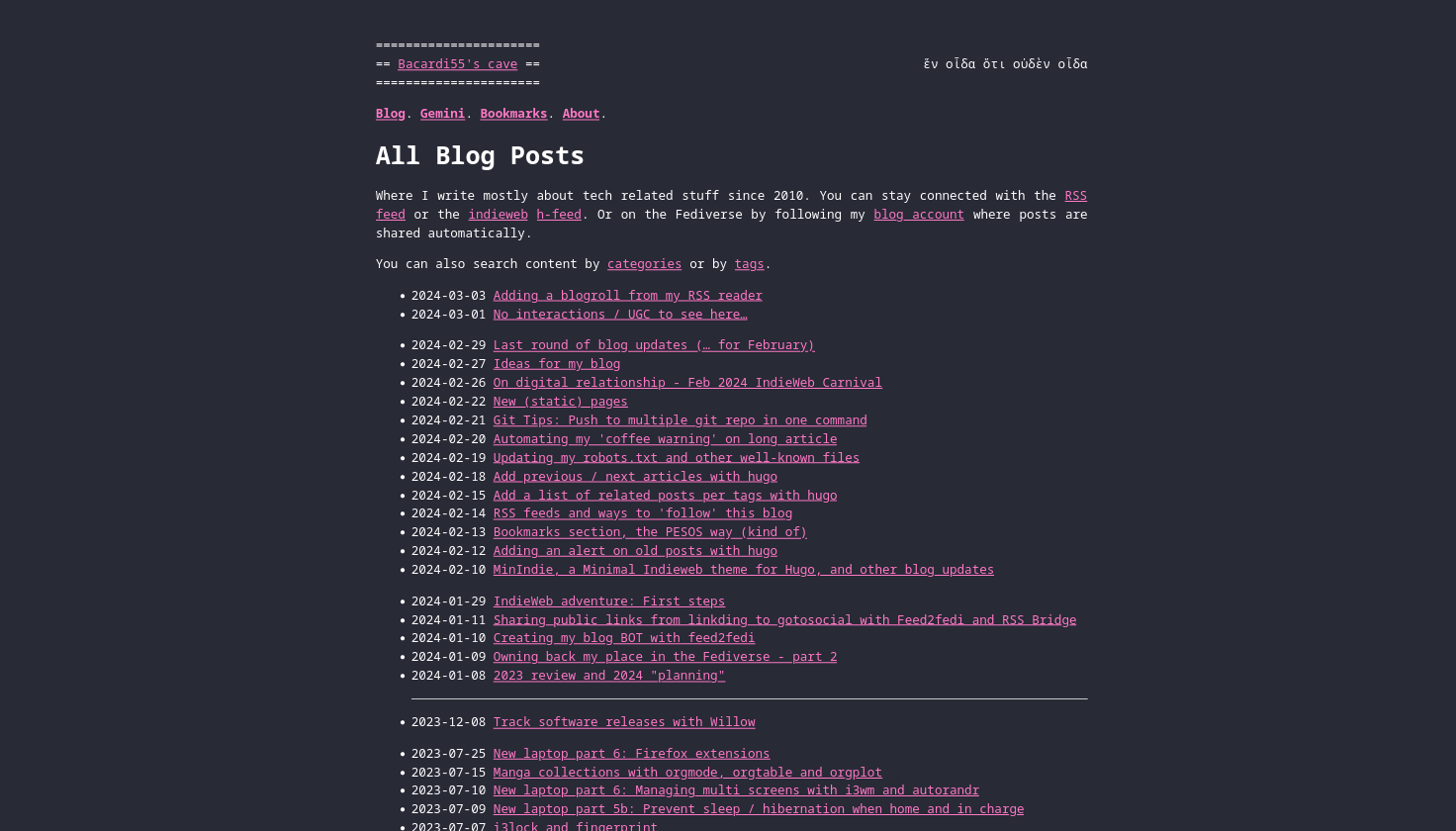
Figure 1: Screenshot of the blog page before the changes
And the new version:

Figure 2: Screenshot of the blog page after the changes
Now years and months are displayed, which means I could removed them from the post line and only leave the day, leaving more space for the title to avoid going back to the next line. I find it easier to browse quickly and cleaner without the <hr/> and weird spaces between lines.
Taxonomy Term Page
The old taxonomy term page looked like this (eg with the selfhosting tag):

Figure 3: Screenshot of the selfhosting taxonomy page before the changes
And the new version:

Figure 4: Screenshot of the selfhosting taxonomy page after the changes
Here, instead of grouping per year and month, I group them by type (posts (blog), bookmarks, gemlog). This allowed me to remove the post type on each line and make it, again, easier on the eyes and simpler to browse.
The How
I’m not sure I did it the best “hugo way”, but at least it is working as I want…
Listing Page
A summarized version bellow, but you can find the full file on sourcehut.
{{ $listtitle := .Title }}
{{ $pageKind := .Kind }}
{{ if or .Title .Content }}
    …
{{ end }}

<div class="h-feed">
    {{ $yearCptr := "" }}
    {{ $monthCptr := "" }}
    {{ range .Paginator.Pages }}
        {{ $postYear := .Date.Year }}
        {{ $postMonth := .Date.Month }}

        {{ if or (ne $monthCptr $postMonth) (and (eq $yearCptr "") (eq $monthCptr "")) }}
                {{ $yearCptr = $postYear }}
                {{ $monthCptr = $postMonth }}
            {{ if and (ne $yearCptr "") (ne $monthCptr "") }}
        </ul>
    </div>
            {{ end  }}
    <div>
        <h3>{{ $monthCptr }} {{ $yearCptr }}</h3>
        <ul>
      {{ end }}

      <li class="h-entry">
          <div hidden>
              {{ partial "bio-hcard.html" . }}
          </div>
          <div class="post-title">
            <time class="date dt-published" datetime="{{ .Date.Format "2006-01-02" }}">{{ .Date.Format "02" }}</time>
            {{ if eq $pageKind "term" }}[{{ .Type }}] {{ end }}
            <a href="{{ .Permalink }}" class="u-url p-name title">
              {{.Title }}
            </a>
          </div>
        </li>

      {{ $yearCptr = $postYear }}
      {{ $monthCptr = $postMonth }}
    {{ end }}
    </ul>
  </div>
</div>

{{ partial "pagination.html" . }}
It is a bit ugly with the if in the middle to close / open =div=s and =ul=s tags, but I couldn’t find a cleaner solution.
Taxonomy Term Page
This looks very similar to the listing pages changes (see full file on sourcehut)
<div>
    …
    {{- if eq .Kind "taxonomy" -}}
        <ul>
            {{ range .Pages.ByTitle }}
            <li><a href="{{ .RelPermalink }}">{{ .Title }}</a></li>
            {{ end }}
        </ul>
    {{ end }}
    {{- if eq .Kind "term" -}}
        {{ $currentType := "" }}
        {{ range sort .Pages.ByDate.Reverse ".Type" "desc" }}
            {{ if or (eq $currentType "") (ne $currentType .Type) }}
                {{ if ne $currentType "" }}
                </ul>
            </div>
                {{ end }}
            <div>
                <h3>{{ strings.FirstUpper .Type }}</h3>
                <ul>
            {{ end }}
                    <li>
                        <time class="date dt-published" datetime="{{ .Date.Format "2006-01-02" }}">{{ .Date.Format "2006-01-02" }}</time>
                        <a href="{{ .RelPermalink }}">{{ .Title }}</a>
                    </li>
            {{ $currentType = .Type }}
        {{ end }}
                </ul>
            </div>
    {{- end -}}
</div>
Main thing here is checking if the .Kind of the page is taxonomy (page listing terms) or term (page listing content tagged with the term of the page).
For taxonomy type of page, a simple list of tags, but for term pages, then same kind of manipulation as the listing page to create different lists per type of article. In alphabetical order, my content types are bookmarks, gemlog and posts, which is the exact opposite order I want them to be… So I used .Reverse to display posts in the order I wanted.
Conclusion
This conclude this very short posts, a continuation of the long list of smaller improvement made to this blog for the past 2 months… And I’m sure not the last one!